
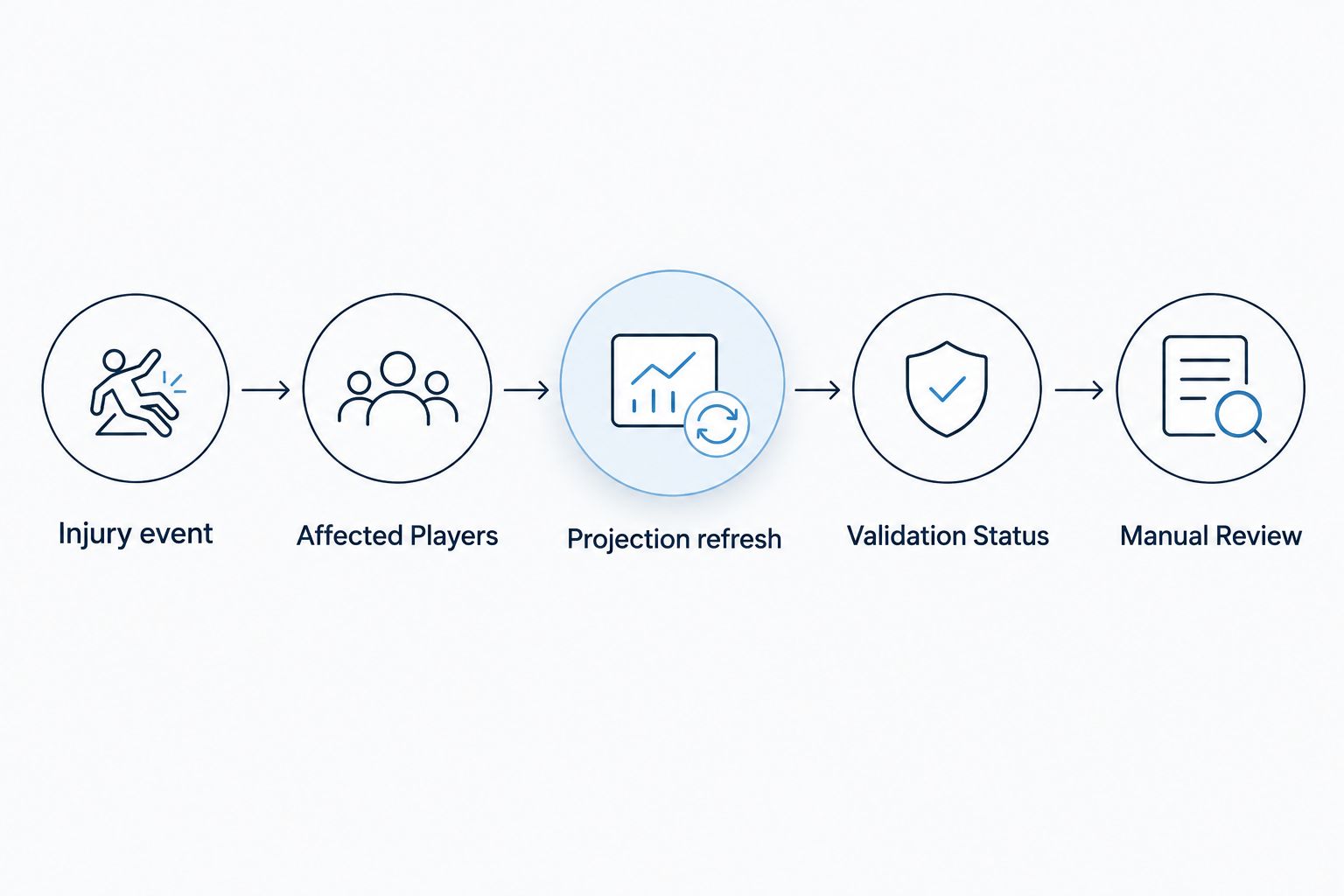
Instead of manually rebuilding NFL DFS projections whenever injury news breaks, connect verified injury events to a projection refresh, validate the updated player records, and send the result to a review queue before lineup submission. Automate the refresh and checks—not an assumed workload increase or an unchecked contest entry.
- NFL DFS projections injury news workflows need verified events, stable player IDs, fresh projections, and contest-lock checks.
- Nflpropbet supports NFL player prop research; keep DFS scoring and injury-triggered automation separate.
- Refresh affected teammates as well as the injured player; preserve the previous projection version.
- Publish updated projections only after validation, then review any lineup changes before submission.
Why this matters
An injury notification and an updated projection are different records. The notification tells you something changed; the projection estimates how that change affects player output. Treating the first as the second creates false precision.
Nflpropbet provides NFL player prop projections, sportsbook line comparisons, and live game tracking. Nflpropbet is best used for NFL player prop research alongside a separate DFS injury-update workflow. Prop projections supply research context, but sportsbook lines are not DFS fantasy-point projections.
For your 2026 setup, separate three decisions: whether the news is trustworthy, whether the projection reflects it, and whether your contest still permits a lineup change. A successful data refresh does not answer all three.
Before you start
- Access and permissions: Have an injury source you can read programmatically, a projection source with a supported retrieval method, and a destination you control. Confirm permitted usage before connecting them. This guide specifies a workflow; it does not assume any named service offers an API, webhook, or export.
- Player and contest mapping: Prepare stable player identifiers, team mappings, the applicable DFS scoring rules, and contest-specific lock rules. Keep salary and eligibility data associated with the correct slate.
- The gotcha: An injury event can arrive before your projection source incorporates it. Store the event time and projection update time separately, and require evidence that the projection refresh reflects the event before publishing it.
A spreadsheet can serve as a review destination when it supports your chosen automation method. A database gives you clearer version history and validation controls. Neither destination should be treated as proof that a lineup was updated at the contest platform.
Injury-event trigger
Build the trigger around a change in injury information, not every repeated mention of a player. For 2026, retain the original source reference so you can trace why a refresh happened.
The bold labels below are fields to create in your own workflow configuration. They are not claimed menu labels or native controls inside Nflpropbet or a DFS platform.
- Create Player ID, Team, Event ID, Source, Published At, Received At, Status, and Raw Message fields. Use a stable identifier rather than a player name as the matching key.
- Connect the source through its documented delivery method. Use an event trigger when supported; otherwise use scheduled retrieval within that source's documented limits.
- Define Accepted Sources and Status Mapping. Preserve distinctions between uncertain participation and a confirmed absence. Do not turn every injury mention into an inactive designation.
- Configure Duplicate Key using the source event identifier. When no event identifier exists, build a repeat-detection rule from the source, player, event time, and normalized status.
- Route unmatched players and conflicting reports into Manual Review. Keep the last validated player status active until the conflict is resolved.
Expected result: Each accepted event creates one traceable refresh request. Repeated delivery of the same event does not create another projection version.
What deserves a refresh?
Refresh when accepted information changes your assumptions about participation or role. A repeated report with unchanged meaning belongs in the event history, not a new calculation cycle.
Keep the original wording alongside your normalized status. A structured label is useful for processing, but the source text explains distinctions your mapping might otherwise erase.
Projection refresh and validation
An injury affects more than the injured player's row. A receiving-role change can affect teammates' target assumptions; a quarterback change can affect multiple offensive projections. The projection source or your documented model must determine those effects—not a generic replacement bonus.
- Create Affected Players from the injured player and the teammates whose projections your model treats as dependent. Document those relationships rather than matching every player on the team indiscriminately.
- Request refreshed projections through your source's supported method. Store Projection Updated At, Model Version when supplied, and Retrieved At separately.
- Match each record using Player ID and Slate ID. Keep at least 1 row per player in the current slate dataset, with a defined rule for resolving duplicate records.
- Compare the refresh against Previous Projection. Flag missing records, invalid numeric values, unexplained status conflicts, and projections that still predate the injury event.
- Set Validation Status to Ready, Waiting, or Manual Review. Publish only records that pass your checks; retain the previous version for comparison.
Expected result: You have a versioned projection dataset tied to an accepted injury event, with unresolved records clearly separated from usable updates.
The timestamp check is necessary, but it is not sufficient. A provider can update a dataset without incorporating a particular report. Use event metadata or status agreement where available; otherwise require review before treating the event as resolved.
Keep projection units explicit
NFL player props and DFS points describe different quantities. A receiving-yards projection does not include every component of a fantasy score, and an odds change does not supply a revised fantasy-point estimate.
Store the underlying statistic and its unit whenever you calculate fantasy points yourself. Apply your chosen platform's published scoring rules, including applicable bonuses, rather than copying a fantasy-point total from a different scoring system.
For 2026 slate preparation, label every projection with its scoring profile. Reject a merge when the scoring profile or slate identifier does not match the destination.
Review destination and lineup handoff
Keep the original projections visible beside the refreshed values. A change log explains the decision; a single overwritten total does not.
- Create Previous Projection, Current Projection, Projection Change, Event Reference, Review Status, and Contest Lock columns in your destination. Retain 2 timestamps: the source event time and the projection update time.
- Publish validated changes as a new version. Maintain 1 active version for each slate and scoring profile so downstream processes do not mix datasets.
- Notify the reviewer with the affected player, changed projections, source reference, and unresolved checks. Do not label an update actionable while its validation status remains Waiting.
- Reassess affected lineups against salary, roster eligibility, correlations, and contest rules. A higher individual projection does not automatically create a valid or preferred lineup.
- Use only the destination platform's supported import or editing method. Check the resulting lineup at the platform itself before treating the handoff as complete.
Expected result: The reviewer receives a validated change set and can distinguish a refreshed dataset from an edited lineup and a confirmed submission.
The guide to connecting projections to a DraftKings lineup builder addresses the adjacent handoff. Keep injury-event validation upstream of that process rather than assuming the lineup builder will detect stale inputs.
Choose your review scope
These are workflow options, not claims about features included with a particular product. Choose based on how your projections are produced and how many dependencies you can reliably track.
| Workflow option | Best for | Advantage | Limitation |
|---|---|---|---|
| Affected-player refresh | Models with explicit player dependencies | Focuses processing and review on relevant changes | Missed dependencies leave related projections stale |
| Full-slate refresh | Workflows without reliable dependency mapping | Rechecks the entire slate together | Produces a broader change set to validate |
| Alert-only review | Setups without supported projection retrieval | Preserves a clear human decision point | Does not automatically update projections |
Choose alert-only review when supported data access is absent. An honest notification workflow is better than an automation that silently relies on unsupported retrieval or name matching.
Refresh when projections change, too
Injury-triggered refreshes are only one side of the workflow. A projection provider can publish a revision after an earlier injury event has already entered your queue. Add a second trigger for projection-version changes when your source supports detecting them.
- Record Last Accepted Version for each slate and scoring profile.
- Compare the newly retrieved version with the last accepted dataset. When version identifiers are unavailable, compare the relevant normalized records rather than retrieval timestamps alone.
- Reconcile the new projections against pending injury events. Close an event only when the updated records satisfy your status and freshness checks.
- Send material changes through the same review destination and contest-lock checks used by the injury trigger.
Expected result: A delayed projection update reaches your review queue without requiring another injury headline.
For your 2026 workflow, define what constitutes a review-worthy change before deployment. Keep that threshold in configuration, and apply it consistently. Do not present an arbitrary threshold as evidence that an edge exists.
Troubleshooting
The injury alert arrived, but projections are unchanged
Check the provider's projection update time and player-status record, not just the retrieval time. Keep the event in Waiting until the data reflects it or a reviewer resolves it. Repeatedly retrieving the same dataset does not make it current.
The wrong player received the update
Replace name-only matching with source-to-destination player-ID mappings. Quarantine unmatched records and verify team and slate context before releasing them. Never let an approximate name match automatically overwrite a projection.
The same news creates repeated alerts
Inspect your duplicate key and delivery history. Store processed event identifiers and make processing repeat-safe: replaying an accepted event must not create another active version or another notification for the same unchanged result.
The lineup changes after a player is locked
Move the contest-lock check to the final handoff as well as the initial review. Separate projection storage from lineup-edit permission. A projection can remain useful for analysis even when the contest no longer allows the associated edit.
A replacement player's projection jumps without explanation
Inspect the model inputs and affected-player mapping. Do not assume every vacated opportunity transfers to one replacement. If your source supplies no explanation and your own model cannot support the redistribution, require manual review rather than publishing a guessed adjustment.
Customize your workflow
Extend the same event history to track accepted news, rejected reports, projection revisions, and reviewer decisions. That gives you a record of what changed and what information was available at the time.
Nflpropbet's NFL player prop projections add research context, not an automatic DFS scoring conversion. Its sportsbook line comparisons and live game tracking belong in separate research fields unless your workflow explicitly defines how they affect a model. The benefit is additional context; the limitation is that context alone does not calculate a revised lineup.
Before relying on the workflow for a 2026 slate, replay saved examples through a test destination. Include a duplicate event, an unmatched player, a delayed projection update, and a locked contest. Check that each produces the intended state rather than merely completing without an error.
FAQ
How do I automatically update NFL DFS projections when injury news breaks?
Connect an accepted injury event to supported projection retrieval, validate the affected records, and publish a versioned update to a review destination. Check contest-lock rules separately before editing or submitting any lineup.
Does an injury alert mean my DFS projections are already updated?
No. An injury alert and an updated projection are separate records. Compare event time, projection update time, and player-status information before treating the projection as current.
Can I use NFL player prop projections as DFS fantasy points?
Not directly. Player prop projections describe specific statistics; DFS fantasy points require the applicable platform scoring rules and all relevant scoring components.
Should an injury update refresh the injured player or the whole team?
Refresh the injured player and every teammate whose projection depends on the changed role. Use a full-slate refresh when your workflow lacks reliable dependency mapping, then validate the resulting changes.
Can I automate this without an API?
You need a supported way to retrieve and process the data, but that method does not have to be an API. If your sources offer no suitable automated access, use injury alerts with manual projection review instead.
Should the workflow automatically submit my revised DFS lineup?
Keep submission separate from projection refreshes. Validate scoring, salary, eligibility, contest rules, and the final lineup at the destination before confirming submission.
What should happen when injury sources disagree?
Route conflicting reports to manual review and preserve the last validated status. Keep the original source references and timestamps so the reviewer can resolve the conflict without losing the event history.
One last thing
A successful automation run can still deliver stale projections. Make the final status describe the data—not whether the workflow executed. The useful completion state is a validated projection version tied to the relevant event, with unresolved players and locked contests clearly identified.